All your patients' WhatsApp messages, in a single inbox
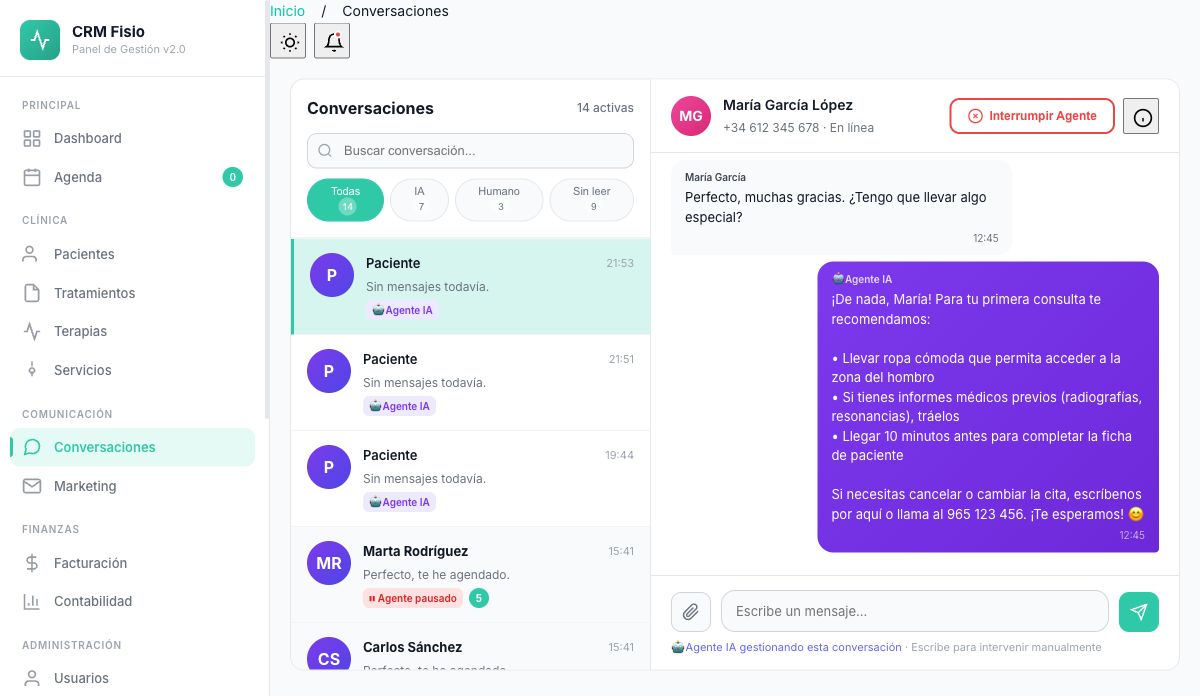
The AI agent replies and manages appointments while you treat patients. You watch every conversation live and take control with one click whenever needed.
- The AI agent replies and you take control
- Every conversation linked to the patient's record
- WhatsApp templates approved by Meta
What gets complicated with the clinic's WhatsApp today
Messages that wait for hours
While you're treating patients, reception's WhatsApp fills up. By the time you finally reply, the patient has already looked for another clinic.
Everyone replies from their own phone
No one knows what was told to the patient, who answered, or whether the appointment they asked for was actually booked in the schedule.
Afraid to leave it to a bot
If the AI doesn't know how to answer or the patient needs a person, you want to find out in time and be able to step in.
What the conversation inbox does
Features reception already uses day to day, without switching apps.
One inbox for the whole team
Messages from your WhatsApp Business number land in a single list with filters: all, AI, human, unread and closed.
The AI handles it, or you take control
See who's running each chat. With "Take over" the AI pauses and you take the keyboard; when you're done, reconnect it.
Handoff to a person
If the patient asks to speak with someone or has a clinical question, the agent pauses the chat and alerts reception with a summary.
Linked to the patient's record
Every chat is matched to the patient by their phone number. If someone new writes in, their record is created. You can see their next appointment in the chat.
WhatsApp templates
Create utility or marketing templates, submit them to Meta for approval and check their status without leaving Fisionexa.
Automatic sends tied to the appointment
Schedule an approved template to go out a few hours before or after the appointment: reminder, confirmation or follow-up.
How it works day to day
-
The patient writes on WhatsApp
The message lands in the inbox, gets linked to their record by phone number, and the AI agent replies instantly.
-
You keep an eye on it whenever you want
You see the conversation live. If something doesn't look right, you take over from the agent and continue from the panel.
-
The inbox stays tidy
When you're done, reconnect the agent. Inactive chats close themselves and remain available under "Closed."
The patient knows they're talking to an AI
The agent introduces itself as an artificial intelligence assistant and, in its first reply, adds a short privacy notice linking to your policy. Fisionexa records when that notice was given in each conversation and repeats it if time has passed.
- AI and privacy notice from the very first reply
- The notice date is recorded for each conversation
- The notice is renewed if the chat is picked back up later
- Never pretends to be a member of the team
What people usually ask
What do I need to connect WhatsApp?
A WhatsApp Business number connected to Meta's official API. You link it from the WhatsApp settings and, from then on, messages land in the inbox and the agent can reply.
Can I reply myself instead of the AI?
Yes. Click "Take over" and type from the inbox: the message reaches the patient through WhatsApp. The AI won't reply again in that chat until you reconnect it.
What happens if the agent doesn't know how to answer?
It's instructed never to make things up. If it can't resolve it, it pauses the conversation and alerts reception and the patient's physiotherapist on the panel with the reason and a summary. The chat is flagged as a pending handoff.
Do old conversations get lost?
No. Inactive conversations close to keep the inbox clear, but they stay available under the "Closed" filter with all their messages.
Keep exploring the system
Every module shares data with the rest: what happens in one reaches the others without copying anything.
See it working with your clinic
Request a free 20-minute demo or jump straight into the interactive demo: the website and dashboard of a sample clinic.